Why student fails in exam
Why student fails in exam???????
Its not the fault of the student if he/she fails, Because the year has an ONLY 365 days. Typical academic year for a student.
1. Sundays- 52,Sundays in a year, which are rest days. Balance 313 days.
2. Summer holidays-50 where weather is very hot and difficult to study. Balance 263 days.
3. 8 hours daily sleep-means 122 days. Balance 141 days.
4. 1 hour for daily playing-(good for health) means 15 days. Balance 126 days.
5. Two hours daily for food & other delicacies (chew properly & eat)-means 30 days. Balance 96 days.
6. 1 hour for talking (man is a social animal)-means 15 days . Balance 81 days.
7. Exam days per year at least 35 days. Balance 46 days.
8. Quarterly, Half yearly and festival holidays)-40 days. Balance 6 days.
9. For sickness at least 3 days. Balance 3 days.
10. Movies and functions at least 2 days. Balance 1 day.
11. That 1 day is your birthday. )))
Wednesday, September 15, 2010

Watch Movies in Microsoft Paint.
Watch Movies in Microsoft Paint.
No joke, did you know that you can watch movies in paint? But u can't do anything (Just watch it when its playing in Winamp... hope no use other than just experimenting..)
Here's what you gotta do :
1.Open your favourite movie player and play the movie (I played the .mpg format in Winamp)
2.Hit "PrintScreen", keep playing the movie in the player, dont stop it.
3.Open MsPaint.
4.Select "Edit>Paste" Or Hit "CTRL+V"
P.S: You can watch movies in Paint! But there are no Pause, Next, Previous, Stop etc. buttons....
Experiment with other formats too, it doesn't play DivX , Flash movies, etc.
No joke, did you know that you can watch movies in paint? But u can't do anything (Just watch it when its playing in Winamp... hope no use other than just experimenting..)
Here's what you gotta do :
1.Open your favourite movie player and play the movie (I played the .mpg format in Winamp)
2.Hit "PrintScreen", keep playing the movie in the player, dont stop it.
3.Open MsPaint.
4.Select "Edit>Paste" Or Hit "CTRL+V"
P.S: You can watch movies in Paint! But there are no Pause, Next, Previous, Stop etc. buttons....
Experiment with other formats too, it doesn't play DivX , Flash movies, etc.
Make Undeletable Folder...!!!
Make Undeletable Folder...!!!
We can actually make folders that cannot be deleted in Windows OS.
It must be made using Command Prompt.
It can only be deleted using Command Prompt.
Steps:
1.Go to cmd.
2.Change to the directory that you want.
3.Assume i change to D:
4.So,in Command Prompt,type D: and [enter].
5.Type in this command "md lpt1\" without quotes and press enter.
6.The folder will now in your D:
7.Go and try and delete or rename it,you cannot do anything to it.
There are still many names that you can use to name the folder:
-lpt1 until lpt9
-CON
-AUX
To delete it:
1.Go to Command Prompt again.
2.Navigate to the directory.
3.Type in rd lpt1\
try this...
We can actually make folders that cannot be deleted in Windows OS.
It must be made using Command Prompt.
It can only be deleted using Command Prompt.
Steps:
1.Go to cmd.
2.Change to the directory that you want.
3.Assume i change to D:
4.So,in Command Prompt,type D: and [enter].
5.Type in this command "md lpt1\" without quotes and press enter.
6.The folder will now in your D:
7.Go and try and delete or rename it,you cannot do anything to it.
There are still many names that you can use to name the folder:
-lpt1 until lpt9
-CON
-AUX
To delete it:
1.Go to Command Prompt again.
2.Navigate to the directory.
3.Type in rd lpt1\
try this...
Make Undeletable Folder...!!!
Make Undeletable Folder...!!!
We can actually make folders that cannot be deleted in Windows OS.
It must be made using Command Prompt.
It can only be deleted using Command Prompt.
Steps:
1.Go to cmd.
2.Change to the directory that you want.
3.Assume i change to D:
4.So,in Command Prompt,type D: and [enter].
5.Type in this command "md lpt1\" without quotes and press enter.
6.The folder will now in your D:
7.Go and try and delete or rename it,you cannot do anything to it.
There are still many names that you can use to name the folder:
-lpt1 until lpt9
-CON
-AUX
To delete it:
1.Go to Command Prompt again.
2.Navigate to the directory.
3.Type in rd lpt1\
try this...
We can actually make folders that cannot be deleted in Windows OS.
It must be made using Command Prompt.
It can only be deleted using Command Prompt.
Steps:
1.Go to cmd.
2.Change to the directory that you want.
3.Assume i change to D:
4.So,in Command Prompt,type D: and [enter].
5.Type in this command "md lpt1\" without quotes and press enter.
6.The folder will now in your D:
7.Go and try and delete or rename it,you cannot do anything to it.
There are still many names that you can use to name the folder:
-lpt1 until lpt9
-CON
-AUX
To delete it:
1.Go to Command Prompt again.
2.Navigate to the directory.
3.Type in rd lpt1\
try this...
Tuesday, September 14, 2010
Hidden Bluetooth software in Windows XP & Vista
1.Open the run command from start menu.
2.Now type fsquirt
This will open a window with text welcome and follow the instructions and you are done
2.Now type fsquirt
This will open a window with text welcome and follow the instructions and you are done
Downalod HD Videos From YOUTUBE
Downalod HD Videos From YOUTUBE
There can't be any simpler and faster method to download Youtube videos in FLV, 3GP, MP3, MP4, 720p HD and 1080p Full-HD qualities than free Firefox addon Easy Youtube Video Downloader which recently got updated to v 2.0 and becoming the world's first 1080p full-HD video downloader for Youtube.
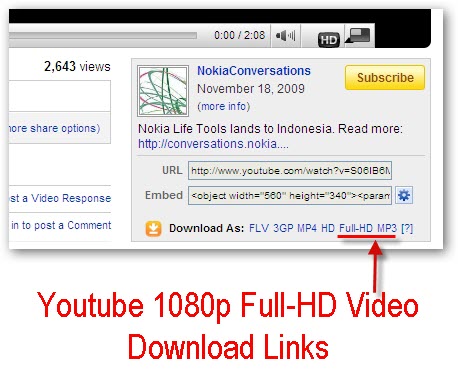
Download This Cool Addon For Firefox At The Below Link:
Unlimited downloads using Rapidshare
Unlimited downloads using rapidshare.this is only working with DSL.
ATTENTION FOR DOWNLOADING: FOR UNLIMITED DOWNLOADS USING RAPIDSHARE:
After a few downloads rapidshare will say you've downloaded too much in less than a certain amount of time.
By doing the following directions everytime it says you've reached your limit for the time being you can do the steps and it erases it all. Then you can proceed with downloading more and more files unlimited.
Do these steps everytime needed, enjoy!
1) Delete all your cookies (tools, internet options etc in IE)
2) click start, run and type 'cmd'
3) Type the following and push enter when instructed: * ipconfig /flushdns (Press Enter) * ipconfig /release (Press Enter) * ipconfig /renew (Press Enter) * exit (Press Enter)
Enjoy....
this is only working with DSL.
ATTENTION FOR DOWNLOADING: FOR UNLIMITED DOWNLOADS USING RAPIDSHARE:
After a few downloads rapidshare will say you've downloaded too much in less than a certain amount of time.
By doing the following directions everytime it says you've reached your limit for the time being you can do the steps and it erases it all. Then you can proceed with downloading more and more files unlimited.
Do these steps everytime needed, enjoy!
1) Delete all your cookies (tools, internet options etc in IE)
2) click start, run and type 'cmd'
3) Type the following and push enter when instructed: * ipconfig /flushdns (Press Enter) * ipconfig /release (Press Enter) * ipconfig /renew (Press Enter) * exit (Press Enter)
Enjoy....
this is only working with DSL.
Turn Your pc on in 10 seconds
Aight so u wanna know how to turn the pc on in 10 seconds Aight heres what u have to do to turn ur pc on in 10 seconds
Aite Click on the start button then press R it will take u to Run well go to run
n type Regedit
press enter
this will open Registery Editor
now look for the key
HKEY_LOACAL_MECHINE\SYSTEM\CurrentControlSet\Contr ol\ContentIndex
now there find the Key Called
"Startup Delay"
Double Click On It
Now where its Base
Click Decimal
Now its Default Value Is 4800000
Change The Value To 40000
here u go u have done it
now close the Registery Editor and Restart Your Computer
You'll See The Result
hope you can use this!
Aite Click on the start button then press R it will take u to Run well go to run
n type Regedit
press enter
this will open Registery Editor
now look for the key
HKEY_LOACAL_MECHINE\SYSTEM\CurrentControlSet\Contr ol\ContentIndex
now there find the Key Called
"Startup Delay"
Double Click On It
Now where its Base
Click Decimal
Now its Default Value Is 4800000
Change The Value To 40000
here u go u have done it
now close the Registery Editor and Restart Your Computer
You'll See The Result
hope you can use this!
Hack Your Modem and Increase Your Download Speed to any Speed You Wish!
Hack Your Modem and Increase Your Download Speed from 64Kbps to any Speed You Wish
Most of us will be feeling that the surfing speed which is allocated by our ISP is not enough. People with 64Kbps will think 128Kbps will be cool speed. People with 128Kbps will think 256Kbps will be cool and so on
This tutorial will teach you how to increase your 64Kbps link to 512Kbps or what ever speed you like.
It is very much possible to do this. With a bit of luck if your Cable Internet Service Provider are very uneducated on how this very new technology works and leave some key loopholes open for you to grab vital information on how to accomplish this task. But this tutorial will no guarantee you 100% success.
Okay here we go. I'm going to try to explain you as best as I can to accomplish re-configuring your SB5100, SB4100 or SB3100 cable modem
Theory of cable modem working
All the cable modems when it boots up it will search for an �Image file� where in all configuration like your upload speed limit and download speed limit is defined. This �Image file� is stored in ISP`s TFTP server. Modem will be pre-configured with the ISP`s TFTP server IP address and the Image file name to be downloaded. When the modem boots up it query TFTP server and download Image file from TFTP server according to this this our speed limits will be set.
Our Mission
Get this Image file from ISP`s TFTP server, reconfigure it according to our need and force our modem to download this file from our Computer rather than downloading it from our ISP`s TFTP server.
Steps to accomplish
1). Get cable modems MAC address
2). Get your ISPs TFTP server IP address
3). Get name and path of the �configuration file� or Image file stored in the ISP`s TFTP server.
4). Download Image file from ISP`s TFTP server.
5). Decrypt the Image file which you downloaded from ISP`s TFTP server
6). Modify the Image file
7). Encrypt the modified Image file
8). Change your computer�s TCP configuration same as ISP`s TFTP server (i.e. IP address same as ISP`s TFTP server)
9). Host TFTP server in your computer
10). Put Image file in the base directory of your TFTP
11). Restart your modem
12). Changer your PC's IP back as given by ISP
13). OOPS Done. Start surfing with your new speed
1). Get cable modems MAC address
You can either look at the back of the modem to get this MAC Address or you can logon to your Cable modem with your Web Browser http://192.168.100.1/ . This is internal HTML pages stored within your DOCsis cable modem (SB5100, SB4100 and SB3100) that gives you even more vital information on configuration. Unless it is turned off by your ISP. This feature might be totally turned off by your ISP.
2). Get your ISPs TFTP server IP address
3). Get name and path of the �configuration file� or Image file stored in the ISP`s TFTP server.
For getting this vital information you have to do an SNMP walk over your modem. For doing this you can use any one of the tools below
a) There�s a program called QUERY.EXE from Weird Solutions which is a BOOTP packet request program that will tell you everything you need to know, without all these extra steps. It will display the Image Filename, TFTP server address, which is really all you need to get started. To use this BOOTP QUERY tool, you need the MAC address of your cable modem
You can download this from:
http://connection.netcordia.com/file.../entry102.aspx
use command �snmpwalk 192.168.100.1 public�
NOTE: Use modem�s IP address as �192.168.100.1� (SB5100, SB4100 and SB3100) when it asked to provide by any of the above tools. SNMP community is �Public�
Using the above tools you will get the information of your ISP`s TFTP server IP and the name of your �Image file� stored in that TFTP server
All your vital information is stored in this file, One of which is the MaxRateDown 2621440; MaxRateUp 393216;. (This was my ISP settings. Which you can see is similar to what speed I was getting. 40KB/s up and 250 KB/s down)
Among these, the one we need are:
Configuration TFTP Server = 194.*.*..90 (replace this with yours throughout in the doc)
Configuration filename = isrr.bin (replace this with yours throughout in the doc)
And
IP fragments created = 0
IP address.10.xxx.xxx.xxx = 10.xxx.xxx.xxx
IP address.192.168.100.1 = 192.168.100.1 (the IP address of the cable modem, (replace this with yours throughout in the doc)
IP-to-If-index.10.xxx.xxx.xxx = 2
Suggestion: You can do this step by sniffing the modem i.e. �192.168.100.1� when modem boots up. I never tried this method. Try your luck.
4). Download Image file from ISP`s TFTP server.
For doing this got to your command prompt and use below commands with out quotes and bracket.
�C:\tftp -i GET �
Okay now you got Image file from your ISP`s TFTP server.
5). Decrypt the Image file which you downloaded from ISP`s TFTP server
6). Modify the Image file
7). Encrypt the modified Image file
Use docsis tool which you can download from
http://sourceforge.net/projects/docsis/
using this program you can decrypt image file change the upload speed and download speed ,save it and encrypt back. Rename this newly created file same as your original image file.
8). Change your computer�s TCP configuration same as ISP`s TFTP server (i.e. IP address same as ISP`s TFTP server)
Go to my network place and right click ->properties
Select your LAN Card right click ->property->Internet Protocol (TCP-IP) double click on it and change it to as following values
Configure your TPC�s TCP settings as below
IP: 194.*.*.90 (replace with the ISP�s TFTP server)
Netmask: 255.255.255.0
Gateway: 192.168.100.1 (replace with your cable modem�s IP address)
Note: Gateway should be 192.168.100.1 then only your modem can communicate with computer.
9). Host TFTP server in your computer
10). Put Image file in the base directory of your TFTP
11). Restart your modem
Download TFTP Server software and host TFTP server in your computer
You can download TFTP server from:
ftp://ftp.ida.net/pub/wireless/tftpd32.exe
Start TFTPD32 server. Go to Settings and set the Security to None. Increase the timeout to 20secs and the Max Retransmit to 6. Choose to translate UNIX filenames. Make sure it's base directory point to where the isrr.bin is (i.e. theimage file which you modified). If you need to replicate a directory pathname along with the image file, then make a directory from root that corresponds to the image file pathname.
Restart your modem, and AS SOON as the SEND light goes solid, you should see a receive on your TFTP server i.e. your PC
12). Changer your PC's IP back as given by ISP
13). OOPS Done. Start surfing with your new speed
Now you change your TCP settings of your PC back to normal as given by ISP. (I.e. Put your original IP address and gateway)
Oops you hacked your modem. Test out by downloading some files using DAP (Download accelerator plus)
Note: This speed will remain same until you restart your cable modem. So each time you reboot your modem you have to follow the steps 8,9,10,11 and 12
Enjoy
By ~Rafomac~
Most of us will be feeling that the surfing speed which is allocated by our ISP is not enough. People with 64Kbps will think 128Kbps will be cool speed. People with 128Kbps will think 256Kbps will be cool and so on
This tutorial will teach you how to increase your 64Kbps link to 512Kbps or what ever speed you like.
It is very much possible to do this. With a bit of luck if your Cable Internet Service Provider are very uneducated on how this very new technology works and leave some key loopholes open for you to grab vital information on how to accomplish this task. But this tutorial will no guarantee you 100% success.
Okay here we go. I'm going to try to explain you as best as I can to accomplish re-configuring your SB5100, SB4100 or SB3100 cable modem
Theory of cable modem working
All the cable modems when it boots up it will search for an �Image file� where in all configuration like your upload speed limit and download speed limit is defined. This �Image file� is stored in ISP`s TFTP server. Modem will be pre-configured with the ISP`s TFTP server IP address and the Image file name to be downloaded. When the modem boots up it query TFTP server and download Image file from TFTP server according to this this our speed limits will be set.
Our Mission
Get this Image file from ISP`s TFTP server, reconfigure it according to our need and force our modem to download this file from our Computer rather than downloading it from our ISP`s TFTP server.
Steps to accomplish
1). Get cable modems MAC address
2). Get your ISPs TFTP server IP address
3). Get name and path of the �configuration file� or Image file stored in the ISP`s TFTP server.
4). Download Image file from ISP`s TFTP server.
5). Decrypt the Image file which you downloaded from ISP`s TFTP server
6). Modify the Image file
7). Encrypt the modified Image file
8). Change your computer�s TCP configuration same as ISP`s TFTP server (i.e. IP address same as ISP`s TFTP server)
9). Host TFTP server in your computer
10). Put Image file in the base directory of your TFTP
11). Restart your modem
12). Changer your PC's IP back as given by ISP
13). OOPS Done. Start surfing with your new speed
1). Get cable modems MAC address
You can either look at the back of the modem to get this MAC Address or you can logon to your Cable modem with your Web Browser http://192.168.100.1/ . This is internal HTML pages stored within your DOCsis cable modem (SB5100, SB4100 and SB3100) that gives you even more vital information on configuration. Unless it is turned off by your ISP. This feature might be totally turned off by your ISP.
2). Get your ISPs TFTP server IP address
3). Get name and path of the �configuration file� or Image file stored in the ISP`s TFTP server.
For getting this vital information you have to do an SNMP walk over your modem. For doing this you can use any one of the tools below
a) There�s a program called QUERY.EXE from Weird Solutions which is a BOOTP packet request program that will tell you everything you need to know, without all these extra steps. It will display the Image Filename, TFTP server address, which is really all you need to get started. To use this BOOTP QUERY tool, you need the MAC address of your cable modem
You can download this from:
http://connection.netcordia.com/file.../entry102.aspx
use command �snmpwalk 192.168.100.1 public�
NOTE: Use modem�s IP address as �192.168.100.1� (SB5100, SB4100 and SB3100) when it asked to provide by any of the above tools. SNMP community is �Public�
Using the above tools you will get the information of your ISP`s TFTP server IP and the name of your �Image file� stored in that TFTP server
All your vital information is stored in this file, One of which is the MaxRateDown 2621440; MaxRateUp 393216;. (This was my ISP settings. Which you can see is similar to what speed I was getting. 40KB/s up and 250 KB/s down)
Among these, the one we need are:
Configuration TFTP Server = 194.*.*..90 (replace this with yours throughout in the doc)
Configuration filename = isrr.bin (replace this with yours throughout in the doc)
And
IP fragments created = 0
IP address.10.xxx.xxx.xxx = 10.xxx.xxx.xxx
IP address.192.168.100.1 = 192.168.100.1 (the IP address of the cable modem, (replace this with yours throughout in the doc)
IP-to-If-index.10.xxx.xxx.xxx = 2
Suggestion: You can do this step by sniffing the modem i.e. �192.168.100.1� when modem boots up. I never tried this method. Try your luck.
4). Download Image file from ISP`s TFTP server.
For doing this got to your command prompt and use below commands with out quotes and bracket.
�C:\tftp -i GET �
Okay now you got Image file from your ISP`s TFTP server.
5). Decrypt the Image file which you downloaded from ISP`s TFTP server
6). Modify the Image file
7). Encrypt the modified Image file
Use docsis tool which you can download from
http://sourceforge.net/projects/docsis/
using this program you can decrypt image file change the upload speed and download speed ,save it and encrypt back. Rename this newly created file same as your original image file.
8). Change your computer�s TCP configuration same as ISP`s TFTP server (i.e. IP address same as ISP`s TFTP server)
Go to my network place and right click ->properties
Select your LAN Card right click ->property->Internet Protocol (TCP-IP) double click on it and change it to as following values
Configure your TPC�s TCP settings as below
IP: 194.*.*.90 (replace with the ISP�s TFTP server)
Netmask: 255.255.255.0
Gateway: 192.168.100.1 (replace with your cable modem�s IP address)
Note: Gateway should be 192.168.100.1 then only your modem can communicate with computer.
9). Host TFTP server in your computer
10). Put Image file in the base directory of your TFTP
11). Restart your modem
Download TFTP Server software and host TFTP server in your computer
You can download TFTP server from:
ftp://ftp.ida.net/pub/wireless/tftpd32.exe
Start TFTPD32 server. Go to Settings and set the Security to None. Increase the timeout to 20secs and the Max Retransmit to 6. Choose to translate UNIX filenames. Make sure it's base directory point to where the isrr.bin is (i.e. theimage file which you modified). If you need to replicate a directory pathname along with the image file, then make a directory from root that corresponds to the image file pathname.
Restart your modem, and AS SOON as the SEND light goes solid, you should see a receive on your TFTP server i.e. your PC
12). Changer your PC's IP back as given by ISP
13). OOPS Done. Start surfing with your new speed
Now you change your TCP settings of your PC back to normal as given by ISP. (I.e. Put your original IP address and gateway)
Oops you hacked your modem. Test out by downloading some files using DAP (Download accelerator plus)
Note: This speed will remain same until you restart your cable modem. So each time you reboot your modem you have to follow the steps 8,9,10,11 and 12
Enjoy
By ~Rafomac~
How to Find and Download Missing Driver Without any Software
Experience of Windows 7 has been wonderful. Windows 7 has got a huge drivers database and you do not need to search and install board drivers for graphics, sound, memory cards and more. If you are using Windows XP or Windows Vista and you just installed fresh copy of it then finding drivers and installing them might feel you a pain. The main problem which average user experiences is they do not know the model of device they have in their computer. So they do not know which driver software will fit their need. We have an easy solution for that. You can easily find all the information you need to find the right driver without any software help or dissecting your PC.
Device Manager of PC has got a solution for you. If you Google the right information, you will find the driver right a single click away. All you need is right information for that device.
Right click at My Computer
Click Properties -> Hardware -> Device manager
See which device has a question sign there
Question sign shows that the driver for that device is not installed.
Right click that device -> Properties -> Details
In details tab there will be 'Device Instance Id'
Below that selection there will be another portion containing the right driver info.
It will be something like;
PCI\VEN_8086&DEV_2930&SUBSYS_50448086&REV_02\3&61A AA01&0&FB
In the above line 'VEN' stands for vender.
Just copy that whole line and Google it.
You will find the right driver to download for that device.
DONT FORGET TO SAY THNKS!!!
Device Manager of PC has got a solution for you. If you Google the right information, you will find the driver right a single click away. All you need is right information for that device.
Right click at My Computer
Click Properties -> Hardware -> Device manager
See which device has a question sign there
Question sign shows that the driver for that device is not installed.
Right click that device -> Properties -> Details
In details tab there will be 'Device Instance Id'
Below that selection there will be another portion containing the right driver info.
It will be something like;
PCI\VEN_8086&DEV_2930&SUBSYS_50448086&REV_02\3&61A AA01&0&FB
In the above line 'VEN' stands for vender.
Just copy that whole line and Google it.
You will find the right driver to download for that device.
DONT FORGET TO SAY THNKS!!!
Thursday, July 22, 2010
Mohan Lal Aged.....Comedy
Mohanlal pennu kanan poyappol ,
penninte achan : alla cherukkan vannille.?
Mohanlal: njan thanneyanu cherukkan.!
...
achan: ho muthachanaloru falithapriyananaloSee More
penninte achan : alla cherukkan vannille.?
Mohanlal: njan thanneyanu cherukkan.!
...
achan: ho muthachanaloru falithapriyananaloSee More
Mohan Lal Aged.....Comedy
Mohanlal pennu kanan poyappol ,
penninte achan : alla cherukkan vannille.?
Mohanlal: njan thanneyanu cherukkan.!
...
achan: ho muthachanaloru falithapriyananaloSee More
penninte achan : alla cherukkan vannille.?
Mohanlal: njan thanneyanu cherukkan.!
...
achan: ho muthachanaloru falithapriyananaloSee More
Love SMS
Ninne vedanipikunnavare
nee snehikuka.
But
Ninne
Snehikunnavare Vedanipikaruthu.
Becoz
Eee lokathinu nee aaro oral mathramanu
pakshe
Aaro oralku nee ellamanu.
nee snehikuka.
But
Ninne
Snehikunnavare Vedanipikaruthu.
Becoz
Eee lokathinu nee aaro oral mathramanu
pakshe
Aaro oralku nee ellamanu.
Love SMS
Ninne vedanipikunnavare
nee snehikuka.
But
Ninne
Snehikunnavare Vedanipikaruthu.
Becoz
Eee lokathinu nee aaro oral mathramanu
pakshe
Aaro oralku nee ellamanu.
nee snehikuka.
But
Ninne
Snehikunnavare Vedanipikaruthu.
Becoz
Eee lokathinu nee aaro oral mathramanu
pakshe
Aaro oralku nee ellamanu.
COOKERY SHOW COMEDY SMS
COOKERY SHOW:
Ningalude phone nannayi kazhukuka
Uppum Mulagum chertha Uzhunnu maavu kondu pothinju,thilacha velichennayil 5 mnt varukuka..
VADAPHONE
Ready!
FOR More Jokes Visit www.rafomac.com
Ningalude phone nannayi kazhukuka
Uppum Mulagum chertha Uzhunnu maavu kondu pothinju,thilacha velichennayil 5 mnt varukuka..
VADAPHONE
Ready!
FOR More Jokes Visit www.rafomac.com
COOKERY SHOW COMEDY SMS
COOKERY SHOW:
Ningalude phone nannayi kazhukuka
Uppum Mulagum chertha Uzhunnu maavu kondu pothinju,thilacha velichennayil 5 mnt varukuka..
VADAPHONE
Ready!
FOR More Jokes Visit www.rafomac.com
Ningalude phone nannayi kazhukuka
Uppum Mulagum chertha Uzhunnu maavu kondu pothinju,thilacha velichennayil 5 mnt varukuka..
VADAPHONE
Ready!
FOR More Jokes Visit www.rafomac.com
Sunday, June 6, 2010
How to Send free Valentine’s cards from your Mobile ?

Do you want to celebrate this "Valentine's Day" with something different? Then, I can share a cool idea with you. Stop sending text (SMS) messages, instead send Valentine eCards to your loved ones from your mobile phone.
RockeTalk offers free Valentine eCards that you can use to create a truly personalized and unique Valentine greeting for that special person(s) from your mobile device. You can attach your own message in voice or text right from cell phone to the card of your choice and send to your special person.
How it works:.
1. Go to http://wap.rockeTalk.com
2. Click on the Valentine’s Day link (banner).
3. Select a card.
4. Add your special message.
5. Send it to a phone number (cell phone) or an email address.
6. Repeat. (To as many people as you like)
Happy Valentine's Day!
Do you want more ideas to celebrate Valentine's Day ?
Get Facebook chat on Mobile Phone

Bitstream has released its new version of free downloadable browser Bolt with advanced features.
Key Features of BOLT 2.1
Facebook chat
Stream Flash video from popular video streaming sites including the BBC and YouTube
Fully supports HTML5 video
Updated webkit engine.
Bolt 2.1 is now available to download from boltbrowser.com.
Click Here to Download BOLT
How to Use Bluetooth to Send Free Messages

I would like to introduce a new mobile application, Blue Shoot , for my readers. Blue Shoot is a program for cell phones and PDAs with you can send messages via Bluetooth to other mobile phones, PDAs, laptops or desktop PC . There is no need to install Blue Shoot on these devices, but Bluetooth is turned on and be visible in the active mode! Blue Shoot is free and runs a variety of modern, but also of older phones that support Java and Bluetooth on. Blue Shoot sends your message in the format of a business card.
Download Blue Shoot
Friday, June 4, 2010
Desktop Icon Text Highlighted -- Adding and Removal
May Be Some People Got Desturbed By Highlighting Desktop Icons Text in their Computer, Espicially Windows XP user, But Some People Like Highlighting, Any way Now i am Going to tell you How to Add Highlighting, i am Posting this Because of My Friend Geoffrey Bourne asked me about That.... So Lets Start..
Steps To Add Highlighting Desktop icon text
1. Click on Start
1. Choose Control Panel
2. Click on System Icon
3. Choose the "Advanced" tab, click "Settings" under "Performance"
4. Under the "Visual Effects" tab I Chose (checked) Use Drop Shadows for Icon Labels
5. Click OK
OR
1. Click Start, and then click Control Panel.
2. Click Performance and Maintenance, and then click System.
3. On the Advanced tab, click Settings under Performance.
4. Click to clear the Use drop shadows for icon labels on the desktop check box,
Click Apply, and then click OK two times.
5. Close Control Panel
If u want Remove Just Do Opposit (Just check that option)
Thanks for Reading My Blog....
Please Comment On This Post and Also Click Donate if u want to Help me to Continue My free Service....
Steps To Add Highlighting Desktop icon text
1. Click on Start
1. Choose Control Panel
2. Click on System Icon
3. Choose the "Advanced" tab, click "Settings" under "Performance"
4. Under the "Visual Effects" tab I Chose (checked) Use Drop Shadows for Icon Labels
5. Click OK
OR
1. Click Start, and then click Control Panel.
2. Click Performance and Maintenance, and then click System.
3. On the Advanced tab, click Settings under Performance.
4. Click to clear the Use drop shadows for icon labels on the desktop check box,
Click Apply, and then click OK two times.
5. Close Control Panel
If u want Remove Just Do Opposit (Just check that option)
Thanks for Reading My Blog....
Please Comment On This Post and Also Click Donate if u want to Help me to Continue My free Service....
Friday, May 28, 2010
Play PS2 Games on Your Computer with PCSX2 PS2 Emulator

PlayStation 2 a successor of sony playstation is best gamming console available in market. The popularity of playstation can be easily judge with number of units sold in mid 2008 which is around 140 millions of playstation 2units.
Commercial Games for playstation 2 are quite good as well as graphics and animations are best compared to normal computer games. Thought price of playstation 2 makes it unaffordable for many true gamers. If you are egger to play games of playstation 2 then here is another alternative, PCSX2 0.9.5 is a first PS2 emulator for desktop computer which lets you to test and play any PS2 games on your computer.
Screenshots of PCSX2 P2 emulator


You need to have Windows XP Professional to install PCSX2 PS2 Emulator.
Download PCSX2 P2 Emulator for free.
Drive a Car in Whole World
Google Maps (for a time named Google Local) is a free web mapping service application and technology provided by Google that powers many map-based services including the Google Maps website, Google Ride Finder and embedded maps on third-party websites via the Google Maps API.
The Maps API is a free beta service, available for any web site that is free to consumers. Using Google API you can embed Google Maps on you website. Earlier this API was in the form of JavaScript but now Google API is powered by Adobe Flash.
People have started building Applications using this API. Here is some thing new for Google MAP, How about Driving Car on Google Map? I am not kidding.
Katsuomi Kobayashi, a developer from Osaka, Japan has developed A 2D Driving Simulator on Google Maps which uses Google Flash API. Amazingly movement of car on Google Map is really fast and is at 40 FPS (Frames per Seconds)
Look at The screenshot

This is Rafomac’s personal project and it is based on 2D Driving Simulator A Flash toy that simulates car parking and trailer movement.
Do you want to try ? Check out here
The Maps API is a free beta service, available for any web site that is free to consumers. Using Google API you can embed Google Maps on you website. Earlier this API was in the form of JavaScript but now Google API is powered by Adobe Flash.
People have started building Applications using this API. Here is some thing new for Google MAP, How about Driving Car on Google Map? I am not kidding.
Katsuomi Kobayashi, a developer from Osaka, Japan has developed A 2D Driving Simulator on Google Maps which uses Google Flash API. Amazingly movement of car on Google Map is really fast and is at 40 FPS (Frames per Seconds)
Look at The screenshot

This is Rafomac’s personal project and it is based on 2D Driving Simulator A Flash toy that simulates car parking and trailer movement.
Do you want to try ? Check out here
Avira AntiVir Premium 1 Month License for Free

A computer without good antivirus software can instantly become house of hundreds of Viruse, Spyware & Malware etc. Nowadays there are many free antivirus software are available for use but quality of those free antivirus software can’t be judge and I doubt wether these free antivirus software will detect any new Virus or Spyware.
Why to download such antivirus software when you can have premium antivirus software, well you don’t need to spend a single penny on this, we will tell you how to get popular Avira AntiVir Premium edition with 6 month of Free License.
Features of Avira Antivr Premium Edition
1. AntiVir protection against viruses, worms and Trojans
2. AntiDialer protection against expensive dialers
3. AntiRootkit protection against hidden rootkits
4. Faster Scanning up to 20% faster
5. New User Interface
6. AntiPhishing protection against phishing
7. AntiSpyware protection against spyware and adware
8. WebGuard protection against malicious websites
9. AntiDrive-by stops malware downloads while surfing
10. RescueSystem creates a bootable rescue CD
11. Enhanced email protection for POP3 and SMTP
12. Fast Premium update server
To Get free Avira AntiVir Premium For 6 months, follow this steps:
1. Go to This Page (Germen)
2. Now Fill-up that Form
Salutation: (select Herr i.e Mr.)
Vorname: First Name
Nachname: Last Name
Email-Adresse: Email Address
Land : Country

3. After you fill the form click lizenz anfordern
That’s it, Now wait for email to arrive from Avira which will contain Avira AntiVir Premium license for 6 months.
How Get Verified PayPal Account with HDFC NetSafe VCC in India

Being verified Paypal account user has several advantages over unverified paypal account. The process of Paypal account verification is quite easy, you just need to link your Credit card in your Paypal account or use your Debit card to verify Paypal account (For US only).
However this simple process of Paypal account verification can become complicated for India users as owning Credit Card is still not under the reach of many India users and unfortunately Paypal doesn’t accept debit card of any indian Bank making account verification almost impossible for India users.
But there is one simple way to verify your Paypal account with HDFC Account. If you are HDFC account holder then you can take advantage of NetSafe a unique service provided by HDFC.
A Brief about HDFC NetSafe
NetSafe, is a unique online payment solution that offers you complete security while shopping on the Internet. With NetSafe, you can now shop online through a virtual credit card, without revealing your actual HDFC Bank Credit Card number. What’s more, you can now use your HDFC Bank Debit Card also for online purchases.
The Virtual Credit Card created with NetSafe act like real Credit Card with only difference it has fix amount set by you and it can be used only one time.
How to Verify PayPal Account With HDFC NetSafe Virtual Credit Card
1. If you have HDFC Bank Account then do register for HDFC Bank Netbanking
2. You must have HDFC Debit Card on your Name.
3. Now go to HDFCBANK.com and check “Netsafe/ Verified by Visa/ MasterCard SecureCode” and click on register.
4. On HDFC NetSafe Home Page Click on Register Button for New user. If already have Netsafe account then go to step 7
5. Complete the registration process. You must provide valid HDFC Debit Card Details while Registering for NetSafe Account.
6. Once your NetSafe account is created successfully. Do make sure you have atleast 1.95 USD ~ RS. 200 INR in your HDFC Bank Account.
7. Now Login to your HDFC NetSafe Account
8. We have to generate new Virtual Credit Card, For this Enter amount RS 200 ~ 1.95 USD and click on Go.

9. Now note down Virtual Credit Card Number, CVV2 & Card Expiry Date
10. Login to your Paypal Account
11. Click on Get Verified Link

12. Now enter Your First Name, Select Vista As Card Type, Enter Virtual Card Number in place of Card Number, set Card Epiry date and enter CVV2 number in place of Security Code.

13. Click on Save and Continue
Here comes the tricky part, most of the users who have attempted to use NetSafe have failed to find Paypal code as you never get transaction statement of Virtual Credit Card in your actual HDFC Account statement and unfortunaly HDFC Customer Care wont help you in this case.
However your NetSafe account does report transaction details of all Virtual Credit Cards you have created and used online but the link to Transaction Details is not easily accessible. Follow below steps to get Paypal code from Netsafe Card Transaction Details.
14 Login to Your HDFC Netsafe Account
15. Now click on All Accounts/Services link

16. You will be greeted with Select to Pay Page. At bottom of the page you have following links ,
Back, Card List, Txn. Details, Logoff

Click on Txn. Details, That’s link to access Transaction Details of All used Virtual Credit Cards
17. You can easily spot Paypal Verification code under Merchant column, note down that code.

18. Go back to your Paypal Account and again click on get Verified Link
19. Now Enter 4 digits Paypal Code which you have got from step 17 and click on Submit.

20. You will be greeted with Your Account is Verified Now.

That’s you have done it, Now you can enjoy features of PayPal Verified Account.
However this simple process of Paypal account verification can become complicated for India users as owning Credit Card is still not under the reach of many India users and unfortunately Paypal doesn’t accept debit card of any indian Bank making account verification almost impossible for India users.
But there is one simple way to verify your Paypal account with HDFC Account. If you are HDFC account holder then you can take advantage of NetSafe a unique service provided by HDFC.
A Brief about HDFC NetSafe
NetSafe, is a unique online payment solution that offers you complete security while shopping on the Internet. With NetSafe, you can now shop online through a virtual credit card, without revealing your actual HDFC Bank Credit Card number. What’s more, you can now use your HDFC Bank Debit Card also for online purchases.
The Virtual Credit Card created with NetSafe act like real Credit Card with only difference it has fix amount set by you and it can be used only one time.
How to Verify PayPal Account With HDFC NetSafe Virtual Credit Card
1. If you have HDFC Bank Account then do register for HDFC Bank Netbanking
2. You must have HDFC Debit Card on your Name.
3. Now go to HDFCBANK.com and check “Netsafe/ Verified by Visa/ MasterCard SecureCode” and click on register.
4. On HDFC NetSafe Home Page Click on Register Button for New user. If already have Netsafe account then go to step 7
5. Complete the registration process. You must provide valid HDFC Debit Card Details while Registering for NetSafe Account.
6. Once your NetSafe account is created successfully. Do make sure you have atleast 1.95 USD ~ RS. 200 INR in your HDFC Bank Account.
7. Now Login to your HDFC NetSafe Account
8. We have to generate new Virtual Credit Card, For this Enter amount RS 200 ~ 1.95 USD and click on Go.
9. Now note down Virtual Credit Card Number, CVV2 & Card Expiry Date
10. Login to your Paypal Account
11. Click on Get Verified Link
12. Now enter Your First Name, Select Vista As Card Type, Enter Virtual Card Number in place of Card Number, set Card Epiry date and enter CVV2 number in place of Security Code.
13. Click on Save and Continue
Here comes the tricky part, most of the users who have attempted to use NetSafe have failed to find Paypal code as you never get transaction statement of Virtual Credit Card in your actual HDFC Account statement and unfortunaly HDFC Customer Care wont help you in this case.
However your NetSafe account does report transaction details of all Virtual Credit Cards you have created and used online but the link to Transaction Details is not easily accessible. Follow below steps to get Paypal code from Netsafe Card Transaction Details.
14 Login to Your HDFC Netsafe Account
15. Now click on All Accounts/Services link
16. You will be greeted with Select to Pay Page. At bottom of the page you have following links ,
Back, Card List, Txn. Details, Logoff
Click on Txn. Details, That’s link to access Transaction Details of All used Virtual Credit Cards
17. You can easily spot Paypal Verification code under Merchant column, note down that code.
18. Go back to your Paypal Account and again click on get Verified Link
19. Now Enter 4 digits Paypal Code which you have got from step 17 and click on Submit.
20. You will be greeted with Your Account is Verified Now.
That’s you have done it, Now you can enjoy features of PayPal Verified Account.
INCREASE INTERNET SPEED, Fast Internet Access...
Let ur Internet goo as fast as possible...
Do u know... Microsoft reserves 20% of your available bandwidth for their own purposes like Windows Updates and interrogating your PC etc
To get it back:
Click Start then Run and type “gpedit.msc” without quotes.This opens the group policy editor.
Then go to:Local Computer Policy then Computer Configuration then Administrative Templates then Network then QOS Packet Scheduler and then to Limit Reservable Bandwidth.
Double click on Limit Reservable bandwidth. It will say it is not configured, but the truth is under the ‘Explain’ tab i.e.”By default, the Packet Scheduler limits the system to 20 percent of the bandwidth of a connection, but you can use this setting to override the default.”
So the trick is to ENABLE reservable bandwidth, then set it to ZERO. This will allow the system to reserve nothing, rather than the default 20%.It works on Win 2000 as well
Speed up your Mozilla firefox
1. Type “about:config” into the address bar and hit return. Scroll down and look for the following entries:
A: network.http.pipelin ing
B: network.http.proxy.p ipelining
C: network.http.pipelin ing.maxrequests
Normally the browser will make one request to a web page at a time. When you enable pipelining it will make several at once, which really speeds up page loading
2. Alter the entries as follows:
Set “network.http.pipeli ning” to “true”
Set “network.http.proxy. pipelining” to “true”
Set “network.http.pipeli ning.maxrequests” to some number like 36. This means it will make 36 requests at once.
3. Finally, right-click anywhere and select New-> Integer. Name it “nglayout.initialpai nt.delay” and set its value to “0". This value is the amount of time the browser waits before it acts on information it recive’s. If you’re using a broadband connection you’ll load pages 2-25 times faster now
Do u know... Microsoft reserves 20% of your available bandwidth for their own purposes like Windows Updates and interrogating your PC etc
To get it back:
Click Start then Run and type “gpedit.msc” without quotes.This opens the group policy editor.
Then go to:Local Computer Policy then Computer Configuration then Administrative Templates then Network then QOS Packet Scheduler and then to Limit Reservable Bandwidth.
Double click on Limit Reservable bandwidth. It will say it is not configured, but the truth is under the ‘Explain’ tab i.e.”By default, the Packet Scheduler limits the system to 20 percent of the bandwidth of a connection, but you can use this setting to override the default.”
So the trick is to ENABLE reservable bandwidth, then set it to ZERO. This will allow the system to reserve nothing, rather than the default 20%.It works on Win 2000 as well
Speed up your Mozilla firefox
1. Type “about:config” into the address bar and hit return. Scroll down and look for the following entries:
A: network.http.pipelin ing
B: network.http.proxy.p ipelining
C: network.http.pipelin ing.maxrequests
Normally the browser will make one request to a web page at a time. When you enable pipelining it will make several at once, which really speeds up page loading
2. Alter the entries as follows:
Set “network.http.pipeli ning” to “true”
Set “network.http.proxy. pipelining” to “true”
Set “network.http.pipeli ning.maxrequests” to some number like 36. This means it will make 36 requests at once.
3. Finally, right-click anywhere and select New-> Integer. Name it “nglayout.initialpai nt.delay” and set its value to “0". This value is the amount of time the browser waits before it acts on information it recive’s. If you’re using a broadband connection you’ll load pages 2-25 times faster now
Thursday, May 27, 2010
Run Multiple Google Talks on a single PC
Here is a simple way to run more than one google talk on a pc....
Right click the google talk application.Go to propertiesPlace this one in the target
"C:\Program Files\Google\Google Talk\googletalk.exe" /nomutex
'nomutex' is the most important part here.
Now u can run as many gtalks as u want.....
For more Visit http://www.rafomac.com/
Right click the google talk application.Go to propertiesPlace this one in the target
"C:\Program Files\Google\Google Talk\googletalk.exe" /nomutex
'nomutex' is the most important part here.
Now u can run as many gtalks as u want.....
For more Visit http://www.rafomac.com/
Friday, October 16, 2009


Thursday, August 27, 2009
EARN MONEY FROM ADBRITE ADS

How it works
On all buying and selling activity referred by your site, you earn:
On all buying and selling activity referred by your site, you earn:
- 50% of AdBrite’s profits for the first 3 months
- 10% of AdBrite’s profit for the next 9 months
Choose Format
Through a single snippet of HTML, AdBrite can serve any combination of the following ad formats:
- Text and banner ads with customizable layout
- Full page ads – A high-paying full-screen ad on the third pageview of your site, shown only once per user per day
Attract Advertisers:
Anyone visiting your site can buy an ad directly on your site by clicking “Your Ad Here.” You’ll also be listed in the AdBrite marketplace, and represented by our busy in-house sales staff.
Control:
You can choose to review each ad before it appears on your site. You can set the price for ads bought directly on your site. You can even have AdBrite show another ad network (your Google AdSense ads, Burst, etc.) if we can’t meet your minimum revenue requirement.
I’m international, can I use AdBrite?
Yes. AdBrite allows foreign advertisers/publishers and non-English sites in our ad marketplace. As we continue to grow internationally, our ability to serve foreign language ads will dramatically increase.

Drive a Car in Whole World
Google Maps (for a time named Google Local) is a free web mapping service application and technology provided by Google that powers many map-based services including the Google Maps website, Google Ride Finder and embedded maps on third-party websites via the Google Maps API.
The Maps API is a free beta service, available for any web site that is free to consumers. Using Google API you can embed Google Maps on you website. Earlier this API was in the form of JavaScript but now Google API is powered by Adobe Flash.
People have started building Applications using this API. Here is some thing new for Google MAP, How about Driving Car on Google Map? I am not kidding.
Katsuomi Kobayashi, a developer from Osaka, Japan has developed A 2D Driving Simulator on Google Maps which uses Google Flash API. Amazingly movement of car on Google Map is really fast and is at 40 FPS (Frames per Seconds)
Look at The screenshot
This is Rafomac’s personal project and it is based on 2D Driving Simulator A Flash toy that simulates car parking and trailer movement.
Do you want to try ? Check out here
The Maps API is a free beta service, available for any web site that is free to consumers. Using Google API you can embed Google Maps on you website. Earlier this API was in the form of JavaScript but now Google API is powered by Adobe Flash.
People have started building Applications using this API. Here is some thing new for Google MAP, How about Driving Car on Google Map? I am not kidding.
Katsuomi Kobayashi, a developer from Osaka, Japan has developed A 2D Driving Simulator on Google Maps which uses Google Flash API. Amazingly movement of car on Google Map is really fast and is at 40 FPS (Frames per Seconds)
Look at The screenshot
This is Rafomac’s personal project and it is based on 2D Driving Simulator A Flash toy that simulates car parking and trailer movement.
Do you want to try ? Check out here
How Get Verified PayPal Account with HDFC NetSafe VCC in India
Being verified Paypal account user has several advantages over unverified paypal account. The process of Paypal account verification is quite easy, you just need to link your Credit card in your Paypal account or use your Debit card to verify Paypal account (For US only).
However this simple process of Paypal account verification can become complicated for India users as owning Credit Card is still not under the reach of many India users and unfortunately Paypal doesn’t accept debit card of any indian Bank making account verification almost impossible for India users.
But there is one simple way to verify your Paypal account with HDFC Account. If you are HDFC account holder then you can take advantage of NetSafe a unique service provided by HDFC.
A Brief about HDFC NetSafe
NetSafe, is a unique online payment solution that offers you complete security while shopping on the Internet. With NetSafe, you can now shop online through a virtual credit card, without revealing your actual HDFC Bank Credit Card number. What’s more, you can now use your HDFC Bank Debit Card also for online purchases.
The Virtual Credit Card created with NetSafe act like real Credit Card with only difference it has fix amount set by you and it can be used only one time.
How to Verify PayPal Account With HDFC NetSafe Virtual Credit Card
1. If you have HDFC Bank Account then do register for HDFC Bank Netbanking
2. You must have HDFC Debit Card on your Name.
3. Now go to HDFCBANK.com and check “Netsafe/ Verified by Visa/ MasterCard SecureCode” and click on register.
4. On HDFC NetSafe Home Page Click on Register Button for New user. If already have Netsafe account then go to step 7
5. Complete the registration process. You must provide valid HDFC Debit Card Details while Registering for NetSafe Account.
6. Once your NetSafe account is created successfully. Do make sure you have atleast 1.95 USD ~ RS. 200 INR in your HDFC Bank Account.
7. Now Login to your HDFC NetSafe Account
8. We have to generate new Virtual Credit Card, For this Enter amount RS 200 ~ 1.95 USD and click on Go.
9. Now note down Virtual Credit Card Number, CVV2 & Card Expiry Date
10. Login to your Paypal Account
11. Click on Get Verified Link
12. Now enter Your First Name, Select Vista As Card Type, Enter Virtual Card Number in place of Card Number, set Card Epiry date and enter CVV2 number in place of Security Code.
13. Click on Save and Continue
Here comes the tricky part, most of the users who have attempted to use NetSafe have failed to find Paypal code as you never get transaction statement of Virtual Credit Card in your actual HDFC Account statement and unfortunaly HDFC Customer Care wont help you in this case.
However your NetSafe account does report transaction details of all Virtual Credit Cards you have created and used online but the link to Transaction Details is not easily accessible. Follow below steps to get Paypal code from Netsafe Card Transaction Details.
14 Login to Your HDFC Netsafe Account
15. Now click on All Accounts/Services link
16. You will be greeted with Select to Pay Page. At bottom of the page you have following links ,
Back, Card List, Txn. Details, Logoff
Click on Txn. Details, That’s link to access Transaction Details of All used Virtual Credit Cards
17. You can easily spot Paypal Verification code under Merchant column, note down that code.
18. Go back to your Paypal Account and again click on get Verified Link
19. Now Enter 4 digits Paypal Code which you have got from step 17 and click on Submit.
20. You will be greeted with Your Account is Verified Now.
That’s you have done it, Now you can enjoy features of PayPal Verified Account.
However this simple process of Paypal account verification can become complicated for India users as owning Credit Card is still not under the reach of many India users and unfortunately Paypal doesn’t accept debit card of any indian Bank making account verification almost impossible for India users.
But there is one simple way to verify your Paypal account with HDFC Account. If you are HDFC account holder then you can take advantage of NetSafe a unique service provided by HDFC.
A Brief about HDFC NetSafe
NetSafe, is a unique online payment solution that offers you complete security while shopping on the Internet. With NetSafe, you can now shop online through a virtual credit card, without revealing your actual HDFC Bank Credit Card number. What’s more, you can now use your HDFC Bank Debit Card also for online purchases.
The Virtual Credit Card created with NetSafe act like real Credit Card with only difference it has fix amount set by you and it can be used only one time.
How to Verify PayPal Account With HDFC NetSafe Virtual Credit Card
1. If you have HDFC Bank Account then do register for HDFC Bank Netbanking
2. You must have HDFC Debit Card on your Name.
3. Now go to HDFCBANK.com and check “Netsafe/ Verified by Visa/ MasterCard SecureCode” and click on register.
4. On HDFC NetSafe Home Page Click on Register Button for New user. If already have Netsafe account then go to step 7
5. Complete the registration process. You must provide valid HDFC Debit Card Details while Registering for NetSafe Account.
6. Once your NetSafe account is created successfully. Do make sure you have atleast 1.95 USD ~ RS. 200 INR in your HDFC Bank Account.
7. Now Login to your HDFC NetSafe Account
8. We have to generate new Virtual Credit Card, For this Enter amount RS 200 ~ 1.95 USD and click on Go.
9. Now note down Virtual Credit Card Number, CVV2 & Card Expiry Date
10. Login to your Paypal Account
11. Click on Get Verified Link
12. Now enter Your First Name, Select Vista As Card Type, Enter Virtual Card Number in place of Card Number, set Card Epiry date and enter CVV2 number in place of Security Code.
13. Click on Save and Continue
Here comes the tricky part, most of the users who have attempted to use NetSafe have failed to find Paypal code as you never get transaction statement of Virtual Credit Card in your actual HDFC Account statement and unfortunaly HDFC Customer Care wont help you in this case.
However your NetSafe account does report transaction details of all Virtual Credit Cards you have created and used online but the link to Transaction Details is not easily accessible. Follow below steps to get Paypal code from Netsafe Card Transaction Details.
14 Login to Your HDFC Netsafe Account
15. Now click on All Accounts/Services link
16. You will be greeted with Select to Pay Page. At bottom of the page you have following links ,
Back, Card List, Txn. Details, Logoff
Click on Txn. Details, That’s link to access Transaction Details of All used Virtual Credit Cards
17. You can easily spot Paypal Verification code under Merchant column, note down that code.
18. Go back to your Paypal Account and again click on get Verified Link
19. Now Enter 4 digits Paypal Code which you have got from step 17 and click on Submit.
20. You will be greeted with Your Account is Verified Now.
That’s you have done it, Now you can enjoy features of PayPal Verified Account.
Play PS2 Games on Your Computer with PCSX2 PS2 Emulator
PlayStation 2 a successor of sony playstation is best gamming console available in market. The popularity of playstation can be easily judge with number of units sold in mid 2008 which is around 140 millions of playstation 2units.
Commercial Games for playstation 2 are quite good as well as graphics and animations are best compared to normal computer games. Thought price of playstation 2 makes it unaffordable for many true gamers. If you are egger to play games of playstation 2 then here is another alternative, PCSX2 0.9.5 is a first PS2 emulator for desktop computer which lets you to test and play any PS2 games on your computer.
Screenshots of PCSX2 P2 emulator
You need to have Windows XP Professional to install PCSX2 PS2 Emulator.
Download PCSX2 P2 Emulator for free.
Wednesday, August 26, 2009
Download Kaspersky Antivirus 2010 with Free License Key for 90 days

Kaspersky Antivirus 2010 is available for quite some time now and best part is it’s compatible with Microsoft latest operating system Windows 7. In past we had covered free Kaspersky Antivirus 2009 with license code for 3 month which is expired now.
Today we have got Free Kaspersky Antivirus 2010 with 90 days license key. The procedure to get free Kaspersky Antivirus 2010 key is bit long but don’t worry just follow below steps carefully and get your own free KIS 2010 key. You can also use License Key obtained from below promotional page to activate KIS 2009.
How to Get Kaspersky Antivirus 2010 License Key
1. Open this (Polish) Promotional Page and fill the form as shown in below screenshot

2. Scroll down at the bottom of page and fill Captcha, at the end you have to complete math’s question answer. For that translate Math’s question using Google Translator (Polish -> English)

3. Once you have complete registration form. Go to login page and enter your login details

Press “Dalej” button to proceed.

4. Now visit this Kaspersky promotional page
5. Fill-up the form as shown in screenshot, after completing form your will receive Activation code in your email.

6. Visit http://www.oem.kaspersky.pl/ and enter the code (given in the email) to proceed.
7. Now fill the form with your details. Enter 521-04-12-987 in the NIP box.
9. You should now receive the activation code which you can use to activate Kaspersky Antivirus 2009 and 2010.
Get Avira AntiVir Premium 6 Month License for Free
A computer without good antivirus software can instantly become house of hundreds of Viruse, Spyware & Malware etc. Nowadays there are many free antivirus software are available for use but quality of those free antivirus software can’t be judge and I doubt wether these free antivirus software will detect any new Virus or Spyware.
Why to download such antivirus software when you can have premium antivirus software, well you don’t need to spend a single penny on this, we will tell you how to get popular Avira AntiVir Premium edition with 6 month of Free License.
Features of Avira Antivr Premium Edition
1. AntiVir protection against viruses, worms and Trojans
2. AntiDialer protection against expensive dialers
3. AntiRootkit protection against hidden rootkits
4. Faster Scanning up to 20% faster
5. New User Interface
6. AntiPhishing protection against phishing
7. AntiSpyware protection against spyware and adware
8. WebGuard protection against malicious websites
9. AntiDrive-by stops malware downloads while surfing
10. RescueSystem creates a bootable rescue CD
11. Enhanced email protection for POP3 and SMTP
12. Fast Premium update server
To Get free Avira AntiVir Premium For 6 months, follow this steps:
1. Go to This Page (Germen)
2. Now Fill-up that Form
Salutation: (select Herr i.e Mr.)
Vorname: First Name
Nachname: Last Name
Email-Adresse: Email Address
Land : Country
3. After you fill the form click lizenz anfordern
That’s it, Now wait for email to arrive from Avira which will contain Avira AntiVir Premium license for 6 months.
Ultimate List of Rapidshare Premium Link Generator Sites
Rapidshare is one of the best file sharing sites. Most of us download a lot of stuff from rapidshare. But there are some annoying things like download limit, no resume capability etc which restricts users. For people who want to use Rapidshare to its full extent, here is a good solution called rapidshare premium link generators.
These premium link generators are used to make your rapidshare links work with all the features of premium account like supporting download resume, downloading with download managers, no waiting time, instant download, high download speeds of files.
We already discussed about how to search rapidshare files in Google and ultimate list of rapidshare search engines which will let you search different kind of files likes e-books, movies, music etc. Also check out,
Free Working Rapidshare login ID or Usernames and passwords
Free Rapidshare Premium Account Checker
Here is a list of rapidshare premium link generators which will create rapidshare premium links when you input the normal rapidshare link. The list is organized in 2 categories, one for rapidshare.de and one for rapidshare.com links indicating the maximum number of links it can generate daily. Use these RS premium link generators and download files from rapidshare with all the benefits of premium users..
Rapidshare.de Link Generators
www.RapidsharePremiumLinkGenerator.Com
Max No of links you can generate daily : Unknown
Rapidshare.com Link Generators
www.rapidquick.net
Max No of links you can generate daily : 3
www.rapidirty.com
Max No of links you can generate daily : Unknown
www.hostyoursites.biz
Max No of links you can generate daily : 10
www.Premium4Me.Com
Max No of links you can generate daily : Unknown
www.RapidDownloader.Info
Max No of links you can generate daily : Unknown
www.Khongbiet.Com
Max No of links you can generate daily : Unknown
www.Rapid-Hook.Com
Max No of links you can generate daily : 4
www.Rapidshack.Us
Max No of links you can generate daily : Unknown
www.Megaez.Com
Max No of links you can generate daily : Unknown
www.RapidsharePremiumLinkGenerator.Com
Max No of links you can generate daily : Unknown
www.rapidhack.prv.pl
Max No of links you can generate daily : 5
www.RapitShare.Info
Max No of links you can generate daily : 5
www.FreeRsLinks.Com
Max No of links you can generate daily : 100
www.Rapidl.Com
Max No of links you can generate daily : 3
www.RapidFile.Us
Max No of links you can generate daily : 2
www.Rapidshare.Co.In
Max No of links you can generate daily : 5
www.RapidLeech.com
Max No of links you can generate daily : Unknown
www.RsFox.Com
Max No of links you can generate daily : 5
www.Rs43.Com
Max No of links you can generate daily : Unknown
www.FreeRapid.Org
Max No of links you can generate daily : Unknown
www.Rapid4All.Com
Max No of links you can generate daily : 5
www.Adomreg.Com
Max No of links you can generate daily : Unknown
This list will be updated regularly whenever I find any interesting and working sites. If you know any more rapidshare premium link generating sites or if you face problems with any of the sites listed above, do let me know through your comments.
Update : I checked the links and removed the non working sites. More premium link generator sites will be added soon. Till then enjoy your downloads with the above listed working RS premium link generator sites.
These premium link generators are used to make your rapidshare links work with all the features of premium account like supporting download resume, downloading with download managers, no waiting time, instant download, high download speeds of files.
We already discussed about how to search rapidshare files in Google and ultimate list of rapidshare search engines which will let you search different kind of files likes e-books, movies, music etc. Also check out,
Free Working Rapidshare login ID or Usernames and passwords
Free Rapidshare Premium Account Checker
Here is a list of rapidshare premium link generators which will create rapidshare premium links when you input the normal rapidshare link. The list is organized in 2 categories, one for rapidshare.de and one for rapidshare.com links indicating the maximum number of links it can generate daily. Use these RS premium link generators and download files from rapidshare with all the benefits of premium users..
Rapidshare.de Link Generators
www.RapidsharePremiumLinkGenerator.Com
Max No of links you can generate daily : Unknown
Rapidshare.com Link Generators
www.rapidquick.net
Max No of links you can generate daily : 3
www.rapidirty.com
Max No of links you can generate daily : Unknown
www.hostyoursites.biz
Max No of links you can generate daily : 10
www.Premium4Me.Com
Max No of links you can generate daily : Unknown
www.RapidDownloader.Info
Max No of links you can generate daily : Unknown
www.Khongbiet.Com
Max No of links you can generate daily : Unknown
www.Rapid-Hook.Com
Max No of links you can generate daily : 4
www.Rapidshack.Us
Max No of links you can generate daily : Unknown
www.Megaez.Com
Max No of links you can generate daily : Unknown
www.RapidsharePremiumLinkGenerator.Com
Max No of links you can generate daily : Unknown
www.rapidhack.prv.pl
Max No of links you can generate daily : 5
www.RapitShare.Info
Max No of links you can generate daily : 5
www.FreeRsLinks.Com
Max No of links you can generate daily : 100
www.Rapidl.Com
Max No of links you can generate daily : 3
www.RapidFile.Us
Max No of links you can generate daily : 2
www.Rapidshare.Co.In
Max No of links you can generate daily : 5
www.RapidLeech.com
Max No of links you can generate daily : Unknown
www.RsFox.Com
Max No of links you can generate daily : 5
www.Rs43.Com
Max No of links you can generate daily : Unknown
www.FreeRapid.Org
Max No of links you can generate daily : Unknown
www.Rapid4All.Com
Max No of links you can generate daily : 5
www.Adomreg.Com
Max No of links you can generate daily : Unknown
This list will be updated regularly whenever I find any interesting and working sites. If you know any more rapidshare premium link generating sites or if you face problems with any of the sites listed above, do let me know through your comments.
Update : I checked the links and removed the non working sites. More premium link generator sites will be added soon. Till then enjoy your downloads with the above listed working RS premium link generator sites.
Sunday, August 23, 2009
Thursday, August 13, 2009
....OPENING SOON.....
..........KIND ATTENTION TO ALL CUSTOMERS.......
AL MAJAZ TRAINING CENTER......OPENING SOON.....
This should be a Partner Organisation in AL MAJAZ GROUP
It include all Majaor Computer Courses from Basic Level to Advanced Level...
If any questions, Contact us at Counter
or at
Tel No. : 00971 4 2652522
Email : almajazstar@gmail.com
AL MAJAZ TRAINING CENTER......OPENING SOON.....
This should be a Partner Organisation in AL MAJAZ GROUP
It include all Majaor Computer Courses from Basic Level to Advanced Level...
If any questions, Contact us at Counter
or at
Tel No. : 00971 4 2652522
Email : almajazstar@gmail.com
AL MAJAZ INTERNET SERVICES
This is Rafomac
....for.....
AL MAJAZ INTERNET SERVICES
Deira, Dubai, U.A.E
Our Services...........
INTERNET BROWSING,
E-MAIL,
FAX,
CHATTING,
LAMINATION,
COLOUR & B/W PRINTS,
Tally ACCOUNTING SOFTWARE DISTRIBUTION.......etc.
....for.....
AL MAJAZ INTERNET SERVICES
Deira, Dubai, U.A.E
Our Services...........
INTERNET BROWSING,
E-MAIL,
FAX,
CHATTING,
LAMINATION,
COLOUR & B/W PRINTS,
Tally ACCOUNTING SOFTWARE DISTRIBUTION.......etc.
Sunday, August 9, 2009
Google Adsense
Here are a few things you should know before signing up with AdSense.
Do not click on your own links. Even to test them out. Even if you're genuinely interested in the product. Don't do it.
Don't encourage anyone to click on your links. The clicks will probably get disqualified and if it happens enough, you will probably get banned. Google has very advanced click-fraud detection so no matter how curious you are, DON'T DO IT.
Email Google AdSense immediately if you notice a sudden surge in activity. If one day you have over a 30% jump in activity, let Google know. It might be a competitor trying to shut your AdSense account down by repeatedly clicking on your links, or it might be genuine activity. Letting Google know, helps you out.
Make sure the number of ads you have on a page are in compliance with the terms. You may only have three ads on a page.
If you're not sure you can do it, don't do it. Or at least, ask Google first.- Review Google Adsense Terms and Conditions
..........................Thank you Google.........................
Tally ERP ACCOUNTING SOFTWARE AVAILABLE HERE

Tally ERP ACCOUNTING SOFTWARE AVAILABLE HERE
Tally is one of the best Accounting softwares available in the World
Tally is a Product of Tally Solutions Ltd.
Tally Solutions Ltd is a Bangalore based financial accounting software company that currently sells into 88 countries beyond its native India, including the United Kingdom, and the Middle East.
Tally's software is mainly used for vouchers, financial statements, and taxation in many industries, and has specialised packages for retail businesses. More advanced capabilities are found in its ERP package
If you need to know more about Tally Software or want to Purchase it
kindly contact
Mr. ABDUL RAFEEQUE KK
Mob. 00971552746110
E-mail. rafomac@gmail.com
rafomac@yahoo.co.in
Tally is one of the best Accounting softwares available in the World
Tally is a Product of Tally Solutions Ltd.
Tally Solutions Ltd is a Bangalore based financial accounting software company that currently sells into 88 countries beyond its native India, including the United Kingdom, and the Middle East.
Tally's software is mainly used for vouchers, financial statements, and taxation in many industries, and has specialised packages for retail businesses. More advanced capabilities are found in its ERP package
If you need to know more about Tally Software or want to Purchase it
kindly contact
Mr. ABDUL RAFEEQUE KK
Mob. 00971552746110
E-mail. rafomac@gmail.com
rafomac@yahoo.co.in
YOU CAN EARN THROUGH INTERNET


If you have a Website or Blog you can earn by using Google Adsense.
In this Google earn money by Advetising specified are in your Website and they will give a Part of their Profit to You also.....
You can see Advertisement like Ads in This Page.....
Important Feature of Adsense is That it Track User's Interest, and also shows the related informations as your Websit have.....
The important attraction of adsense is that, these advertisements work as a reference for the Visitors for that subjuct.......
Please Comment on this Subject...............
Thank you Google......
In this Google earn money by Advetising specified are in your Website and they will give a Part of their Profit to You also.....
You can see Advertisement like Ads in This Page.....
Important Feature of Adsense is That it Track User's Interest, and also shows the related informations as your Websit have.....
The important attraction of adsense is that, these advertisements work as a reference for the Visitors for that subjuct.......
Please Comment on this Subject...............
Thank you Google......
...............WELCOME TO MY BLOG.........
This is Rafomac
....for.....
AL MAJAZ INTERNET SERVICES
Deira, Dubai, U.A.E
Our Services...........
INTERNET BROWSING,
E-MAIL
FAX
CHATTING
LAMINATION
COLOUR & B/W PRINTS
Tally ACCOUNTING SOFTWARE DISTRIBUTION.......etc.
....for.....
AL MAJAZ INTERNET SERVICES
Deira, Dubai, U.A.E
Our Services...........
INTERNET BROWSING,
FAX
CHATTING
LAMINATION
COLOUR & B/W PRINTS
Tally ACCOUNTING SOFTWARE DISTRIBUTION.......etc.
Subscribe to:
Posts (Atom)